AI-Agent
Michal bot
OpenClaw like telegram bot that manages my life
TLDR
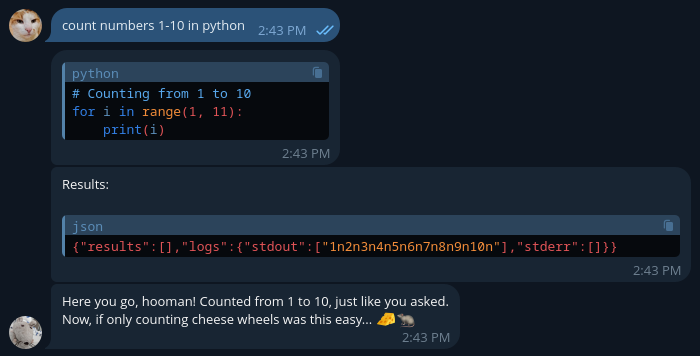
Not long before OpenClaw was first introduced, I have built a Telegram bot that has access to a Turso database where it can keep track of stuff I tell it to. Ranging from a grocery list, to-do list and a list of my friends who owe me something. It can understand images via OCR, it can write and execute code via E2B and it can search the web using the Exa search. The bot is built using the AI-SDK and is a great example of how to build an agent that can manage your life. OH and it has a personality of an Ikea stuffed rat.
The why?
Sometimes, I want to set a reminder for something, but I don't want to thing about a specific time when to receive it, like 12:34am tomorrow. I was looking for a way where I could just say "remind me in 5 hours" and the reminder would get set. After a bit of thought, I have decided to use an LLM for it!
I really like the Telegram chat app for its UX, desktop and mobile apps and their great bot support. I have decided to make a Telegram agent that I can use to set and receive reminders using all my devices. For this, I have used the AI-SDK and made a simple bot that calls an LLM with tools when I send a message.
const result = await generateText({
         model: openrouter('openai/gpt-5.4'),
         system: reminderSystemPrompt,
         tools: {
          tool({
             description: "Schedule a message",
             inputSchema: z.object({
                 time: z.number().int().min(1),
                 message: z.string().min(1),
             }),
             execute: async ({ time, message }) => {
               await scheduleMessage(time, message);
             }
         });
}
This was the first step for the project, after playing with it for a bit, I really liked the bot and wanted to add more features. The first thing was to add a database so it can remember stuff!
My first thought was to add a database of what my friends owe me, like money, beer or stuff I lent them. For this, I have used Drizzle as an ORM and Turso as a database. I have created a simple table and added tools to read and write to it. Now I can ask the bot to remember that my friend owes me a beer and it will remember it for me!

This worked great at first but I quickly ran into a problems when I wanted to add more tables/features. Each new table I wanted to add required me to write up to 4 tools for CRUD operations. This was 1. Annoying and 2. Not very scalable. I wanted to add a grocery list, a to-do list and a list of my friends who owe me stuff. I also red some articles saying that the performance of LLM's goes rapidly down when the number of tools increases. I have decided to try a different approach, instead of creating a tool for each table, I have created a single tool that can read and write to any table in the database. This way I can add new tables without having to write new tools.
For this reason, I have created a single tool, where the agent specifies the table it wants to work with, the operation it wants to perform and the data it wants to read/write. The tool then parses this information and does the thing. This way I can add new tables without having to write new tools. The tool also has a schema for each table, so the agent knows what data it can read/write.
const db_crud = tool({
  description: "Performs basic create, read, update, and delete operations on the database.",

  inputSchema: z.object({
    operation: z.enum(["create", "read", "update", "delete"]),
    table: z.enum([
      "debtors",
      "video_ideas",
      "todos",
      "friends",
      "whatFriendsWantFromMe",
      "scheduledMessages",
      "fridgeItems"
    ]),
    data: z.record(z.string(), z.any()).optional()
  }),

  execute: async ({ operation, table, data }) => {
    const selectedTable = mapStringToTableName(table);

    if (operation === "create") {
      return await db.insert(selectedTable).values(data).returning();
    }

    if (operation === "read") {
      return await db.select().from(selectedTable);
    }

    if (operation === "update") {
      const { id, ...updates } = data;
      return await db
        .update(selectedTable)
        .set(updates)
        .where(eq(selectedTable.id, id))
        .returning();
    }

    if (operation === "delete") {
      return await db
        .delete(selectedTable)
        .where(eq(selectedTable.id, data.id))
        .returning();
    }
  }
});
Simplified code for the article. I do not use nested ifs, don't worry.
Next, I wanted the bot to keep track of what is in my fridge. I have created a table for fridge items and added a tool to read and write to it. But making the list by hand is really time consuming. I wanted to be able to just take a picture of my fridge and have the bot tell me what is in it. For this, I have made it so when I send an image, the bot will first forward it to an LLM with vision capabilities, that can describe what is in the fridge in detail. Next it parses the response and populates the fridge table.